Hosting and Embedding Support Videos in Zendesk and Intercom
Choose your video host before you record, or risk a blank embed in Zendesk or Intercom.

Someone on the support team records a crisp two-minute walkthrough, finds the "insert video" button in the help center editor, pastes the link, and hits publish. The video area stays blank. No error message, no red text, just a blank space where a video should be. That blank space is the allowlist doing its job.
Both Zendesk and Intercom only render video from a short list of approved hosting sources inside their article editors and conversation windows. Paste a link from outside that list and the platform simply ignores it. This makes the hosting decision the first decision to settle, before recording or editing begins. Picking the wrong host leaves the recording, the editing, and the captions all finished and unusable. The rest of this guide treats hosting as the architecture it actually is, with the recording and editing steps coming only after the foundation is confirmed.
Which video sources Zendesk's article editor will render
Zendesk's article editor toolbar works with a fixed set of approved video hosting services. Anything outside that set needs a workaround called "allow unsafe HTML," and for a lot of Zendesk accounts, that workaround isn't available or isn't something an admin will turn on.
A community forum thread requesting that Synthesia be added to the list puts a number on it: Zendesk has approved 7 video hosting services for the article editor toolbar. That's a finite, Zendesk-managed list, not a setting an account holder can expand on their own. The same thread calls the "allow unsafe HTML" option "not a solution for many Zendesk users," which is as close to an official warning label as a forum post gets. Turning it on opens the door to raw embed codes, but it also opens a security conversation most support teams don't want to have just to get a video to play.
Synthesia makes a good case study here. As of the forum post in November 2024, Synthesia wasn't on Zendesk's approved list, and a user was actively asking for it to be added. By December 2024, it was approved. A month is a short wait if a team can afford to pause, and a real problem if an article needed to ship the week the request went in. Synthesia itself isn't the lesson. A hosting platform a team already uses and trusts can be completely blocked today and fully supported next month, with no guarantee on the timeline in between.
Which video sources Intercom's article editor will render
Intercom runs its own separate allowlist, and the path for getting a new platform added works the same way it does on the Zendesk side: there isn't one, at least not one an account holder controls directly. Intercom's community documentation confirms the list of supported video hosting sites is fixed, and the official response to a request for an unlisted platform is to file it as a feature request, with no promised timeline and no guaranteed outcome.
Synthesia's own documentation lays out a workflow that actually works on Intercom: copy the Share Page URL from Synthesia, click the + button in Intercom's article editor, select "Embed Video," and paste the URL in. That confirms Synthesia sits on Intercom's approved list.
The two platforms pull apart in a way that matters for anyone running both. Synthesia is approved in Intercom. Synthesia was not approved in Zendesk as of November 2024, and only landed on Zendesk's list the following month. A team recording Synthesia-based training videos for an Intercom-only help center is in good shape. The same team, if it also runs a Zendesk help center, could publish a video that works perfectly in one system and vanishes in the other, with the exact same file and the exact same link.
Self-hosted video runs into its own wall. A separate Intercom community thread asks specifically for S3 embedding support, the kind of setup security-conscious teams often prefer because it keeps video data inside infrastructure they control. That request confirms S3 and similar bucket-hosted video aren't supported as an embed source in Intercom. A private, locked-down video server might be the safest place to store a file and still be the worst possible choice for actually getting that file in front of a customer.
What happens to embedded videos when Zendesk and Intercom content syncs
Running one help center is one allowlist to track. Running Zendesk and Intercom together, with content syncing or importing between them, means tracking two allowlists at once, and an embed that passes the first one can still fail the second.
Intercom's import documentation confirms that public articles can be brought over from Zendesk, but the import is a one-way door. Once it happens, the connection to the original is severed, the move can't be undone, and imported articles don't land in collections automatically. Someone has to go back in and reorganize them by hand. The documentation also flags an HTML wrinkle: Intercom's conversation-initiating message bodies don't support HTML at all, while conversation parts and outbound messages can contain it. Any embed code built on raw HTML is gambling on which of those categories it lands in after the move.
Intercom also offers a continuous sync option instead of a one-time import, keeping a view-only copy of Zendesk content updated automatically, refreshing about once an hour after the first sync runs. That word "view-only" is the catch. Synced articles can't be edited inside Intercom. If a video embed breaks somewhere in that sync, there's no fix available on the Intercom end. The only way back is through the original Zendesk source.
Those two pieces together compound the risk. A hosting source approved in Zendesk but missing from Intercom's list will produce a broken embed in the synced copy, and that break can't be patched locally. Someone has to go back to the source article, swap the hosting platform, and wait for the next sync cycle or re-run the import. For any team planning to sync or import content between the two platforms, the hosting source needs to clear both allowlists before the first article gets written. Fixing it after the fact costs time, and on the import path, it isn't even fixable once that connection to the original has been cut.
Hosting sources that work across both platforms
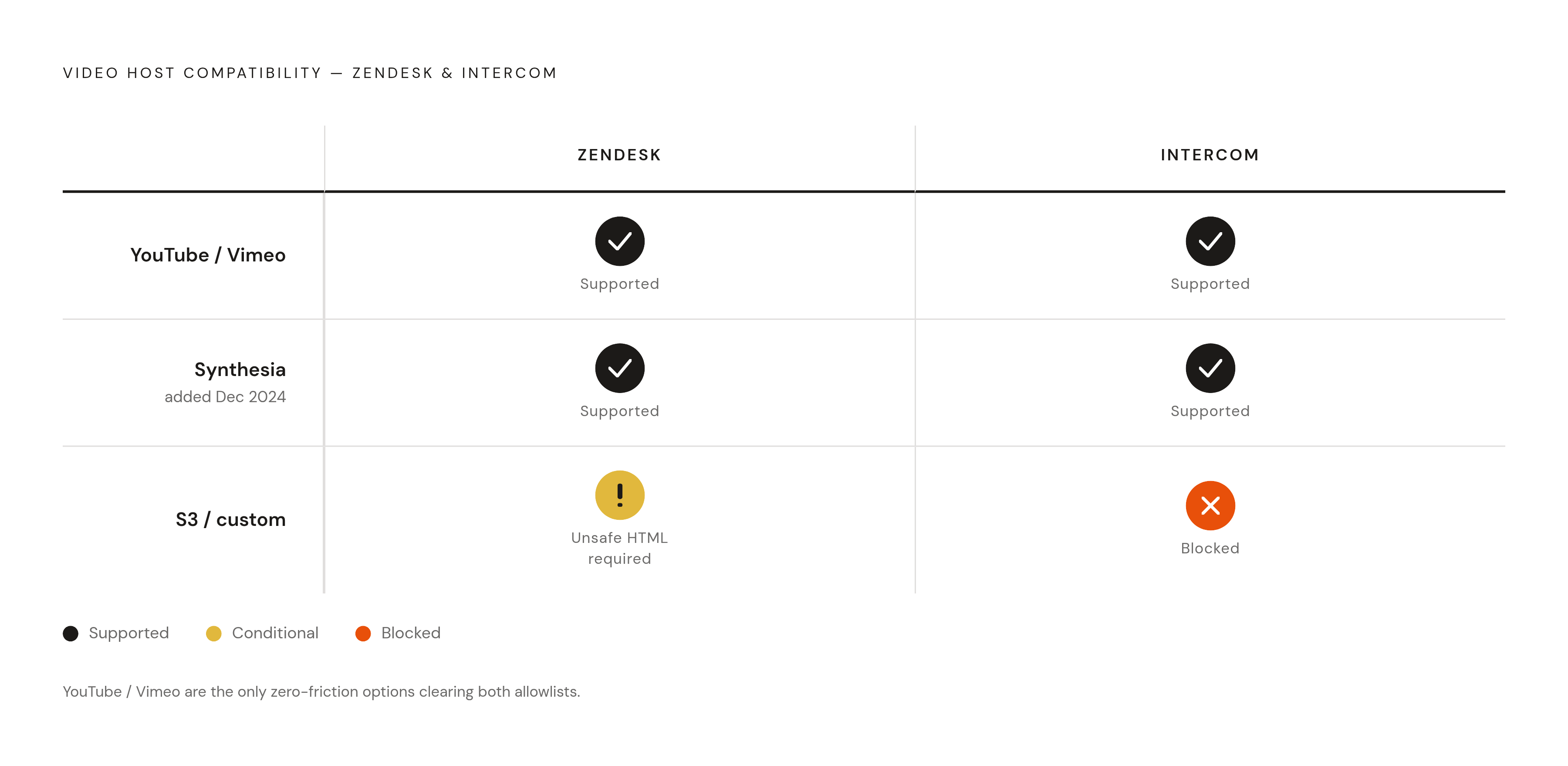
Cross-platform compatibility is really the whole game once a team is running Zendesk and Intercom side by side, and two names keep showing up as safe on both sides: YouTube and Vimeo. Both are referenced as supported across the communities and documentation for each platform, which makes them the lowest-friction starting point for any team that doesn't want to spend a feature request on getting a video to show up.
The choice between the two comes down to what the video needs to do. YouTube makes sense when the goal is reach and zero hosting cost, and when the content isn't sensitive enough to need gatekeeping. Vimeo's paid tiers add privacy controls, like password protection and domain-level restrictions, which suit internal documentation or paid customer content that shouldn't be floating around publicly. Neither platform asks anything extra of a Zendesk or Intercom administrator. No "allow unsafe HTML" toggle, no feature request sitting in a queue, no waiting on a product team's roadmap. Use the built-in embed tool, and it works.
Synthesia sits in a more specific spot on this map. It's confirmed as an approved embed source in Intercom, documented directly by Synthesia itself, and it's also confirmed as an approved source in Zendesk, both through Zendesk's own documentation and that resolved community feature request from late 2024. That makes it a solid single-platform choice for a team running Intercom alone, and a fine choice today for a team running both, though the gap between its Intercom approval and its later Zendesk approval is a reminder that "approved now" and "approved everywhere" aren't the same claim.
S3 and other custom-hosted setups land on the opposite end. They're confirmed unsupported in Intercom, and in Zendesk they hit the same "allow unsafe HTML" obstacle that blocks any unlisted platform. A security team that insists on keeping video in its own storage bucket needs to route that video through an approved platform as a proxy.
Embedding a video after confirming the hosting source
Once the hosting question is settled, the actual embedding step is almost anticlimactic. The hard part was never clicking the button. The hard part was knowing which button would work.
In Intercom articles, the supported path is to copy the share URL from the approved hosting platform, click the + button inside the article editor, choose "Embed Video" from the menu, and paste the URL in. That's the same pattern Synthesia's own documentation walks through for its Intercom integration, and it holds for YouTube and Vimeo links too. Sticking to this native embed button instead of pasting raw iframe code keeps the video working inside Intercom's editor, since raw iframes are more likely to fail outright or force a team into workarounds that aren't officially supported.
In Zendesk articles, the toolbar has its own dedicated video embed option covering the 7 approved hosting services. Copy the video's URL from the approved platform, use that toolbar option, and the embed renders without any extra configuration. The "allow unsafe HTML" route is there for anything outside the approved list, but it's a limitation to work around, not a setting to reach for by default. The community thread that flagged it called it not a solution for many Zendesk users.
One last check belongs here, before anything goes live. If an article is ever going to be synced or imported between Zendesk and Intercom, confirm the hosting source clears both allowlists before publishing it anywhere. That one check, done up front, is cheaper than discovering a broken embed in a read-only synced copy months later.
Producing support videos worth embedding, keeping them short, specific, and maintainable
Getting a video to render is only half the job. The video also has to earn the three minutes someone spends watching it. A long, meandering walkthrough that technically embeds correctly can still be a worse support experience than no video.
Specificity beats breadth almost every time. A two-to-five-minute recording titled "How to refund a duplicate invoice" beats a sprawling fifteen-minute tour of the entire billing module, because a customer searching for help on one specific problem can find the exact video that solves it, watch it, and move on. Nobody wants to scrub through a general walkthrough hunting for the three minutes that apply to them. If a video's title sounds like a chapter in a manual, it's trying to do too much.
A script, even a rough one, pays for itself. Unscripted recordings tend to pick up dead air, wrong clicks, and backtracking, all of which pad the runtime without adding anything a customer needs. A written outline of what to click, in what order, with narration lines worked out ahead of time, produces a tighter final video and usually a shorter one too.
Accessibility isn't a nice-to-have tacked on at the end. Captions, narration that names the actual button or menu item instead of a vague "click here," and a written step-by-step version alongside the video all widen who can actually use the content, and all of them cut down on follow-up tickets from someone who couldn't follow the video alone. Auto-generated subtitles and transcripts, built in at the production stage, mean the video shows up caption-ready before it ever reaches Zendesk or Intercom.
Length is also the strongest argument for restraint, maintenance-wise. Software changes. Buttons move, flows get redesigned, a feature gets renamed. When that happens, a five-minute video covering one task is cheap to re-record. A forty-minute onboarding epic covering a dozen tasks is a production project every time one piece of it goes stale, and an outdated video sitting in a help center doesn't just fail to help. It actively misleads the person watching it, confidently walking them through steps that no longer exist.
Sources
- Request to add Synthesia to Zendesk's list of approved video hosting services for embedding videos via the article editor toolbar
- What are the supported video hosting websites to embed video on Articles?
- s3 video embedding capabilities
- How can I embed videos in an article?
- s3 video embedding capabilities